
WhatsApp Introduces Username Feature For Privacy And Easy Contact
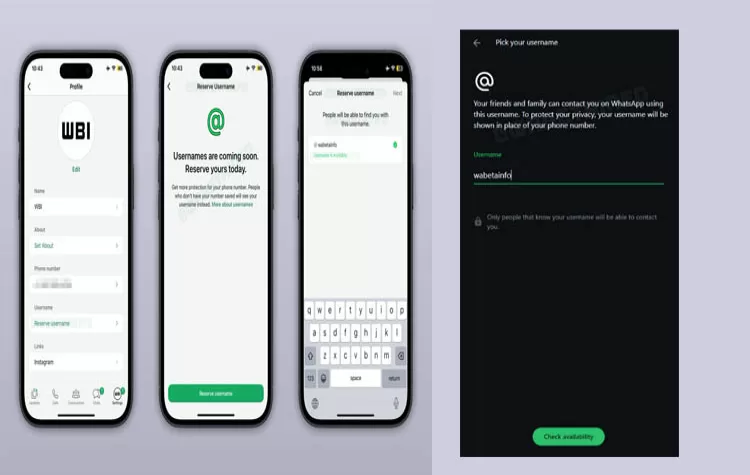
Feature Rollout and Availability
WhatsApp introduced its new username feature. The feature enables users to establish connections without disclosing their phone contact information. The rollout is limited at present. The feature is accessible to particular users who use iOS and Android devices. The system will be expanded to more users during the upcoming sequential launch.
What the Username Feature Does
The current system requires users to provide their phone number before they can initiate a chat. The process creates privacy issues because users must share their phone number with new contacts.
The username feature changes this process:
- Users can chat and call without revealing their phone number
- Personal numbers stay hidden from others
- Users who block others will find their blocking system works better because blocked users will lose all ways to contact them.
The feature helps users communicate in a safer manner. It becomes essential when users need to control their personal information disclosure.
Username Rules and Setup
WhatsApp has defined clear rules for creating a username:
- Length must be between 3 and 35 characters
- Allowed characters include:
- Lowercase letters (a–z)
- Numbers (0–9)
- Periods (.)
- Underscores (_)
Users face these restrictions:
- They must not use "www" as a prefix
- They must not use ".com" or ".net" as a suffix
Users can create a Username Key that consists of 4 digits. This key adds a layer of identification and control.
- New contacts require both the username and the key
- This system helps decrease the number of unwanted messages that users receive from spammers
The Accounts Center enables users to connect their username with Instagram and Facebook accounts. Security experts recommend that users establish separate usernames for each platform they use.
How to Check Feature Availability
The feature is not yet available to all users. The following steps show how to verify feature access:
- Open WhatsApp
- Go to Profile Settings
- Look for the username option
The update will become available in the near future because the rollout process is still ongoing.
Tags Cloud