
Ganesh Chaturthi AI Photo Editing: 5 Trending Prompts To Create Stunning Lord Ganesha Images
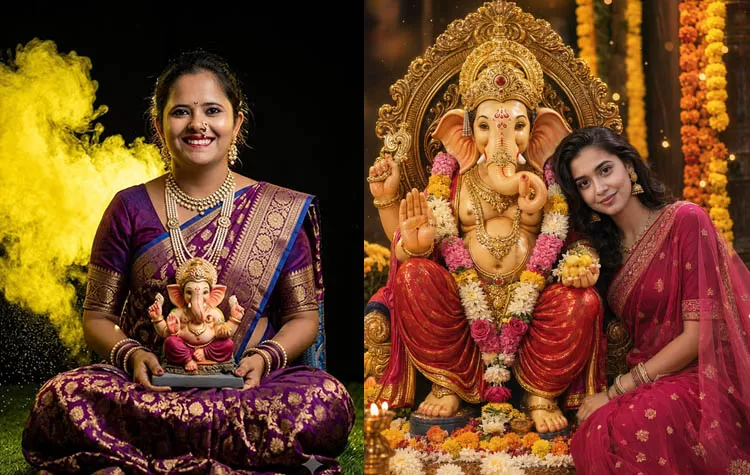
Want to transform your boring picture into an elegant festive portrait featuring Lord Ganesha? AI photo editors like ChatGPT and Google Gemini can help you convert a regular photo into a creative Ganesh Chaturthi image using a well-written prompt.
From traditional Indian costumes and temple location to glowing diyas, marigold flowers, and divine golden lighting, artificial intelligence can transform your photo into a memorable festival-themed portrait. The best part is you can ask the AI tool to retain your original face and appearance while editing your background, outfits, and overall mood of the image.
Looking for trending Ganesh Chaturthi AI photo-editing prompts? Here are 5 creative ideas that you can try.
How to Make a Ganesh Chaturthi AI Photo
Making a festive AI image is super simple. All you need to do is select a well-lit photo of you and upload it into an AI image-generating or photo-editing tool like ChatGPT or Google Gemini. Copy one of the prompts below and make the necessary changes to it in accordance to your preference.
For realistic results, ensure that you mention that you want to retain your facial features, hairstyle, skin texture, and identity.
1. Lord Ganesha Blessing Photo Prompt
Create a devotional image with Lord Ganesha next to you offering blessings. This prompt is great for making a Ganesh Chaturthi profile picture or sharing a festive image on social media.
AI Prompt:
“Make my uploaded photo a realistic and beautiful devotional portrait with Lord Ganesha standing beside me and blessing me with his raised hand. Add fresh marigold flowers, glowing diyas, traditional Indian decorations, and an elegant festive background. Retain my exact facial features, hairstyle, skin texture, and natural identity. Use warm golden lighting, realistic photography, and intricate details. Keep my expression natural and recognizable. No text or watermark.”
2. Grand Ganpati Celebration Photo Prompt
If you are looking to make a colourful and energetic festival picture, try using this grand Ganpati celebration photo prompt.
AI Prompt:
“Edit my uploaded photo to a grand Ganesh Chaturthi celebration scene with beautifully decorated Lord Ganesha idol beside me. Add colourful marigold garlands, traditional festive decorations, glowing diyas, flower arrangements, and soft decorative lights. Retain my original face, facial structure, expression, and identity. Make it a vibrant, cinematic, and photorealistic image with realistic colours and natural proportions. Make the image look like a professionally captured festival photo. No text or watermark.”
3. Traditional Indian Ganesh Chaturthi Portrait
Looking to make a classy and traditional festival portrait? This prompt lets you add elegant Indian clothes and a premium festive background while retaining face realism.
AI Prompt:
“Edit my uploaded photo into an elegant traditional Indian portrait with Lord Ganesha beside me. Dress me in beautiful traditional Indian attire like a saree, kurta, lehenga, or sherwani while retaining my original face and natural appearance. Add a sophisticated Ganesh Chaturthi backdrop with flowers, diyas, subtle golden decorations, and traditional artistic details. Use soft warm lighting, realistic skin texture, natural body proportions, and a premium professional photography style. Retain my identity and facial features accurately. No text or watermark.”
4. Divine Golden Glow Ganpati Photo
For a serene and spiritual portrait look, use this divine golden glow prompt to make a devotional image inspired by a temple atmosphere.
AI Prompt:
“Make a serene and photorealistic Ganesh Chaturthi portrait using my uploaded photo. Place Lord Ganesha beside me in a peaceful temple-inspired setting surrounded by fresh flowers and glowing diyas. Add a subtle divine golden glow, elegant traditional decorations, and soft cinematic lighting. Retain my exact facial features, hairstyle, skin texture, and natural identity. Keep the image realistic, graceful, and detailed without excessive visual effects. Make it a calm devotional image with natural proportions. No text or watermark.”
5. Dreamy Ganpati Festival Photo
A dreamy evening festival portrait is perfect for social media posts, WhatsApp profile pictures, and creative Ganesh Chaturthi greetings.
AI Prompt:
“Edit my uploaded photo to a dreamy Ganpati festival portrait with Lord Ganesha beside me. Add colourful flowers, traditional decorations, glowing diyas, elegant festive lights, and a beautiful evening celebration atmosphere. Retain my exact face, facial features, hairstyle, and identity without changing my natural appearance. Use cinematic photography, warm lighting, realistic textures, natural proportions, and a joyful yet devotional mood. Make the final image look detailed, professional, and photorealistic. No text or watermark.”
Tips to Maintain Realistic Faces in AI Photos
Sometimes AI photo editing tools can unintentionally alter the face, hairstyle, and facial proportions of a person in the image. For a more realistic look, ensure that you add instructions like:
- Preserve my exact facial features and identity.
- Do not change my face and facial structure.
- Keep my original hairstyle and natural skin texture.
- Maintain realistic body proportions.
- Do not add text, logos, or watermarks.
Using a good quality, well-lit photo can also help you have a more realistic AI photo.
Create Your Own Ganesh Chaturthi AI Image
With these Ganesh Chaturthi AI photo prompts, you can transform a regular photo into a beautiful devotional portrait, a traditional Indian festival image or a cinematic Ganpati celebration picture. You can also experiment with the tools to try different outfits, lighting styles, backgrounds, and decorations for a unique image that captures the spirit of Ganesh Chaturthi.
Whether you need a Lord Ganesha blessing photo, Ganpati AI profile picture or a festive image for Instagram and WhatsApp, these prompts are a great starting point for your next AI photo project.
Tags Cloud