
Apple IOS 27 Update Released: Check Supported IPhones And New Features
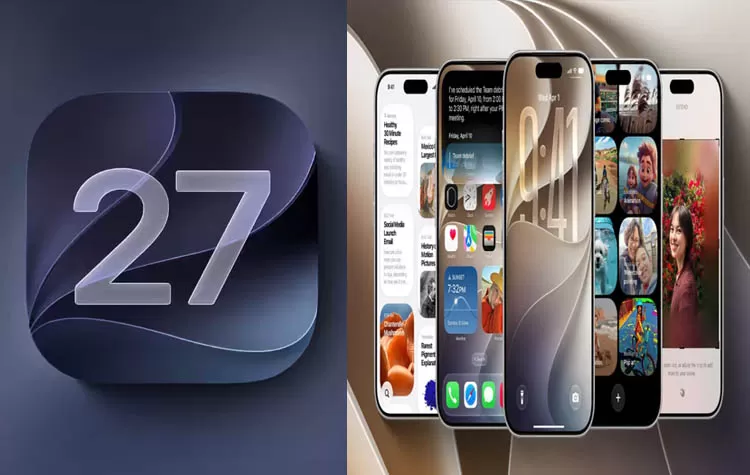
Apple has announced the official release of iOS 27 for eligible iPhone models. The latest iOS version brings a variety of new features, improvements, and cutting-edge artificial intelligence updates. The software update is anticipated to improve the overall experience of using an iPhone with a smarter Siri, enhanced personalization options and customization, and improved privacy and security features.
iPhone users can view a list of eligible devices for the latest iOS update and discover what changes Apple introduced to the mobile operating system.
Apple iOS 27 Released: What’s New?
iOS 27 received multiple updates and modifications to offer a better performance and experience when using an iPhone. The upgraded Siri artificial intelligence is set to provide a smarter, more interactive, and helpful personal assistant experience when using an iPhone.
With the new and improved Siri experience, users will be able to receive more informative answers, ask follow-up questions, and rely on Apple’s voice-activated assistant to perform tasks across apps. Some of Siri’s advanced AI features may only be available on newer iPhone models due to hardware specifications.
Apple updated Liquid Glass interface customization, widgets, app icons, and more.
iOS 27 Supported iPhone Models
Apple released iOS 27 for eligible iPhone models. According to Apple’s official compatibility list, iPhone 11 and newer are eligible for the latest iOS update.
The following iPhone models are supported by iOS 27:
- iPhone 11, iPhone 11 Pro, and iPhone 11 Pro Max
- iPhone SE (2nd generation and newer)
- iPhone 12 series
- iPhone 13 series
- iPhone 14 series
- iPhone 15 series
- iPhone 16 series
- iPhone 17 series
- iPhone 18 series and later compatible devices
Depending on the specific device, some features may be unavailable due to differences in hardware specifications, processors, regions, and languages.
New Siri AI Features in iOS 27
Siri is one of the most essential features Apple introduced to the iOS mobile operating system. The upgraded Siri artificial intelligence is set to bring a smarter, more interactive, and informative experience when using Apple’s voice assistant. Eligible iPhone models and regions will be able to enjoy enhanced conversational experiences, access information across apps, and receive more helpful responses from Siri.
Some of Siri’s advanced AI features may only be available on newer iPhone models due to hardware specifications. Apple Intelligence features, including writing, photo editing, visual, and automation tools, will also be available to users with Siri-compatible devices.
More iOS 27 Features to Know
- Aside from Siri AI, Apple introduced several modifications and new features to the iOS mobile operating system. The following changes are part of the latest iPhone software update:
- Liquid Glass customization: Users will be able to enjoy advanced interface customization and personalization.
- Photo editing: New AI-powered photo editing features will be available for supported devices.
- Parental controls: Enhanced parental control and restriction options will be accessible through the Settings app.
- Shortcuts app: Users will benefit from improved automation tools and natural language assistance when using the Shortcuts app.
- Performance improvements: iOS 27 features system-level enhancements and optimizations to improve the performance of apps and daily tasks.
- Communications improvements: Modifications to supported messaging apps are set to improve the overall experience when using them.
- Certain features may be inaccessible due to regional, device, or language-specific variations.
How to Download and Install iOS 27
- Eligible iPhone users can download and install the latest iOS update by following these steps:
- Launch Settings and tap General followed by Software Update.
- Make sure iOS 27 is available for your device by tapping the option to check for updates.
- Once iOS 27 is available, tap the Download and Install option to begin installing the latest update.
- Follow the prompts and instructions to complete the iOS update.
- Before installing the latest iOS update, users must ensure their iPhone is connected to a stable Wi-Fi network, has enough battery power, and has sufficient storage space.
Tags Cloud